Event registration software · SaaS
From the first sign‑up to the last person through the door.
One system for the form, the approvals, the signed QR pass, the email and WhatsApp reminders and check-in on the day — and a team that can run the registration desk with you.
Prefer to talk? Call +91-8728997778
Conclave is a SaaS product created, owned and managed by ZEBIQ TECHNOLOGY LLP. About the company
- Nothing to install at the door
- QR check-in is a web page on whatever phones the venue already has, and it keeps scanning when the network drops.
- Email and WhatsApp, with proof
- Every message carries its own delivery record — sent, delivered, opened, bounced, failed — so nothing is a theory.
- Hosted for you, or in your country
- Run as a service by ZEBIQ TECHNOLOGY LLP. Where delegate data has to stay in one jurisdiction, it can be deployed there.
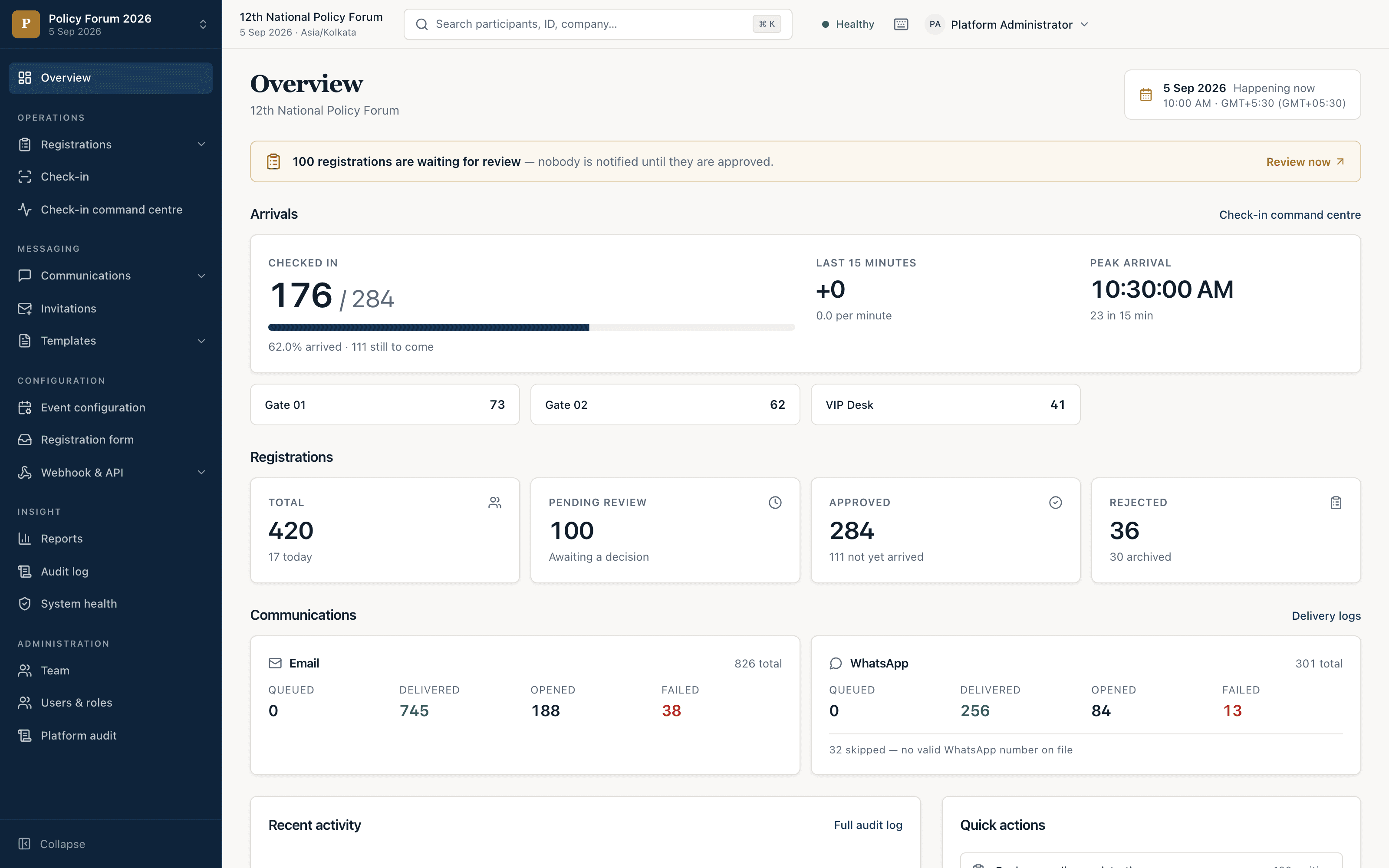
The actual screens
Four screens the week of an event is spent in.
Real captures of the running application, not illustrations of it. Pick one.
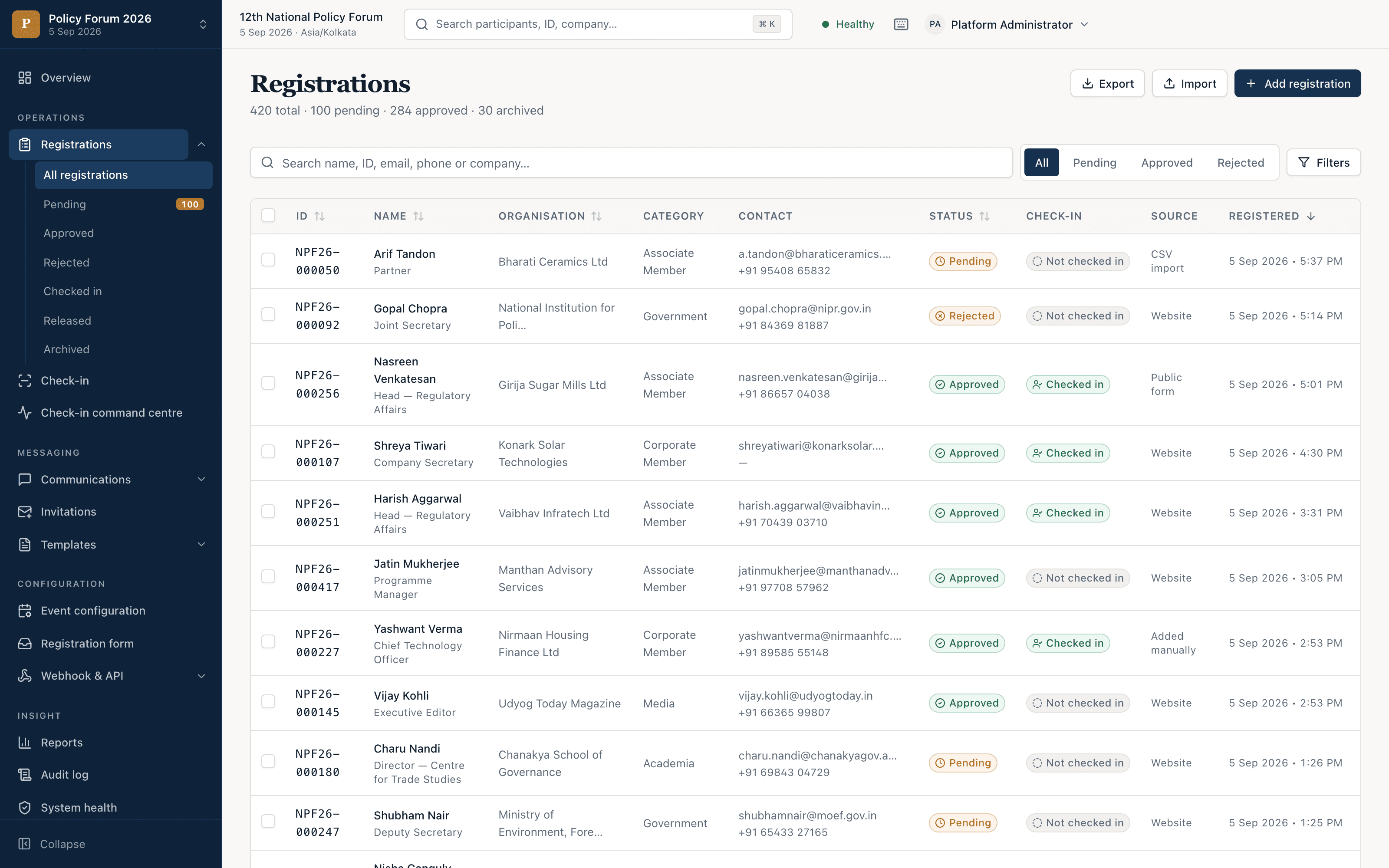
One list, every decision on it
Search, filter by status, category or arrival, keep the filter as a saved view and export what is on screen. Import and manual entry sit beside the public form.
- Public form or invitation only, with your own fields
- CSV import with column mapping and duplicate matching
- Approve one, or the whole pending queue at once
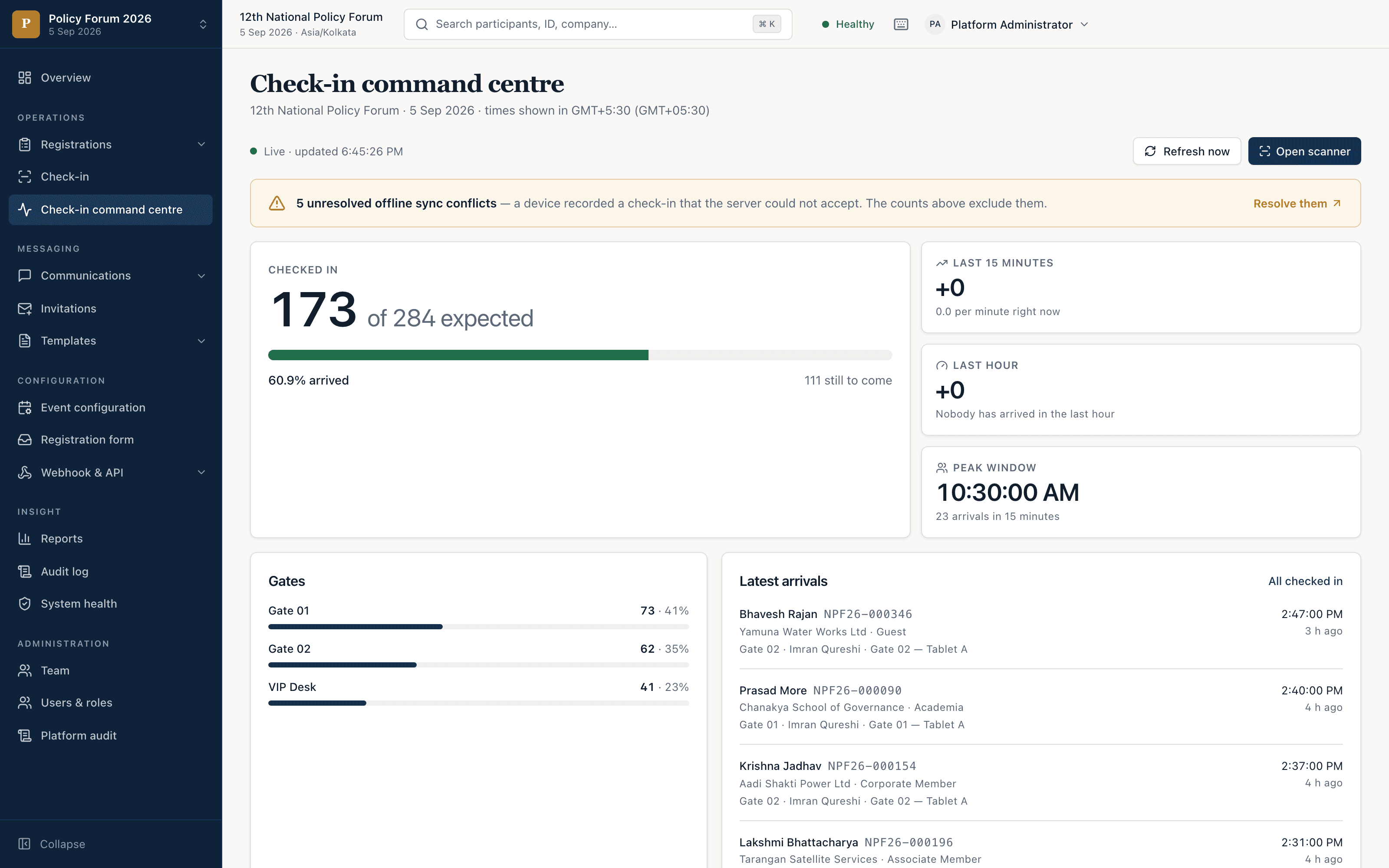
The door, live
Arrivals as they happen, by gate and by device, with a conflict queue for the scans a person has to decide. Scans are held on the device when the network drops and synced when it returns.
- A scan in a phone browser — nothing to install
- Arrivals by gate, by operator, by device
- Keeps scanning when the venue Wi-Fi gives out
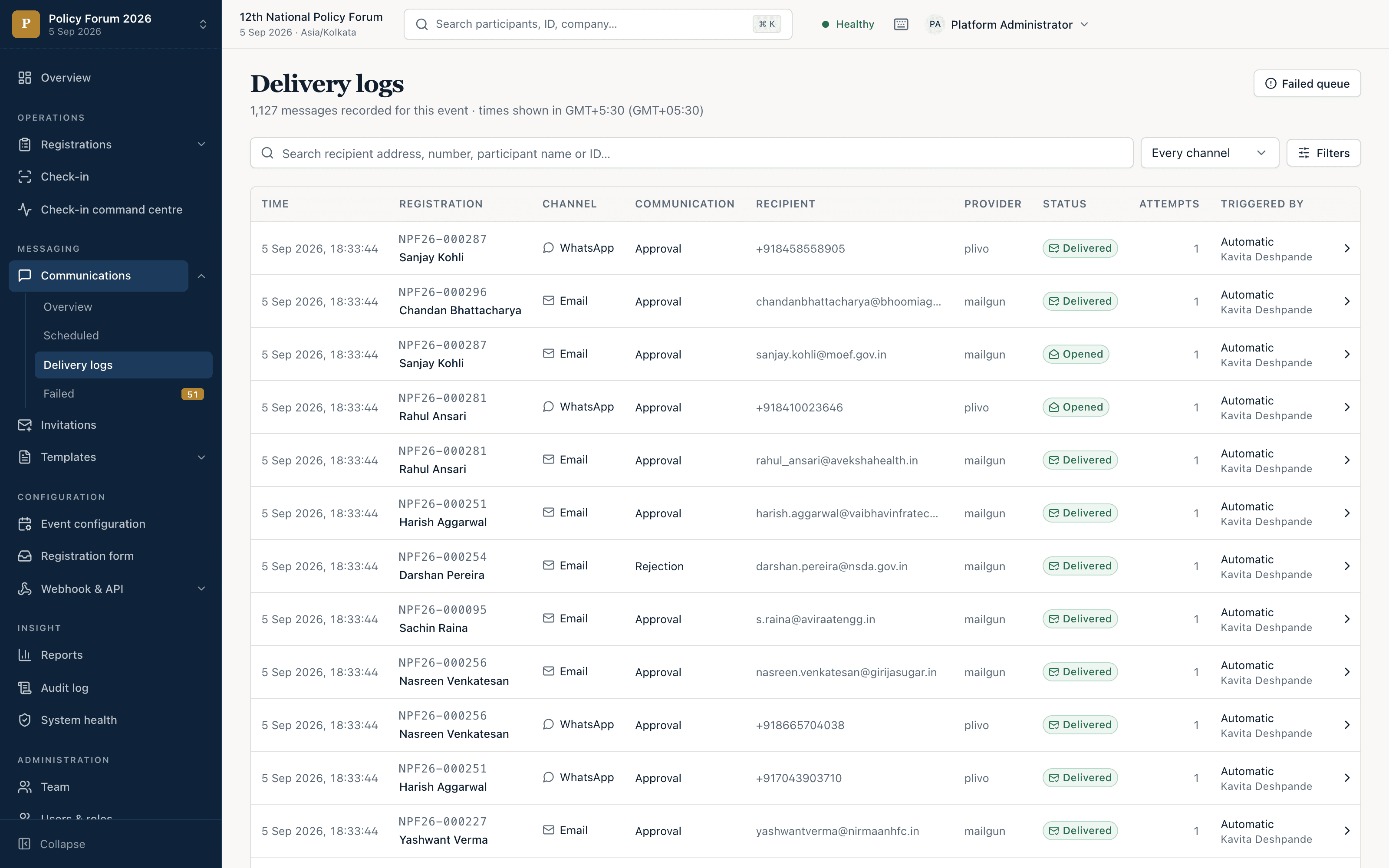
Messaging you can prove was delivered
Every email and WhatsApp the platform sent, per recipient, with what happened to it. Failures collect in their own queue, so a bad address is something you fix rather than something you discover at the door.
- Each event sends under its own name and address
- WhatsApp through the sender Meta has approved for you
- Sent, delivered, opened, bounced, failed — per message
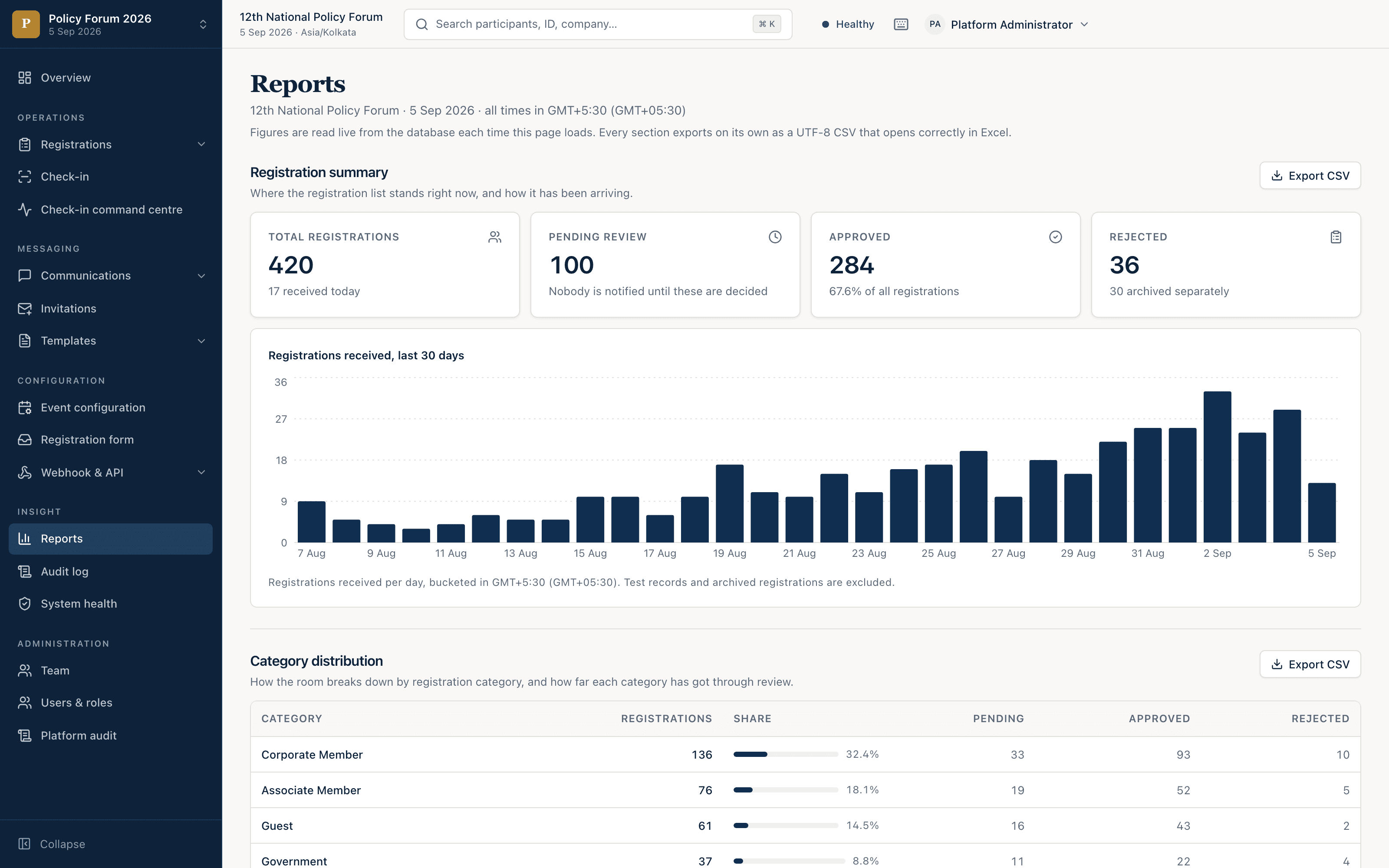
The numbers, and the record behind them
Read live from the database each time the page loads. Registrations per day, the split by category, arrivals by gate — and every section exports as a CSV that opens correctly in Excel.
- Per-event roles; contact details masked from the door
- An audit log of every consequential action
- Everything exports
Screenshots are of the public demo, which runs on a seeded dataset rebuilt nightly. The numbers on them are that dataset’s, not a customer’s.
How it works
One record, followed the whole way through.
The same registration carries every decision made about it. Nothing is re-keyed between stages, so nothing has to be reconciled afterwards.
- 01
Register
A public form or invitation only, with your own fields — or import the list you already hold.
- 02
Approve
By hand or automatically. One at a time, or the whole pending queue at once.
- 03
Issue
Approval issues the signed QR entry pass and sends the confirmation in the same step.
- 04
Remind
Scheduled against the event date — 14 days, 3 days and 1 day out — then a thank-you.
- 05
Check in
A scan in a phone browser at the gate. No app, and it survives losing the network.
- 06
Report
Delivery records, exports, and an audit log of every consequential action.
And when they cannot come: a delegate releases their own place from a link in their confirmation email. The seat comes back to you, and you see who released it and why — rather than finding out at the door.
The details
Built for the parts that usually go wrong.
Six things the software does that you only notice on the day they would have gone wrong.
Approving is one action, not three
Approval issues the signed QR pass and sends the confirmation in the same step — so nobody turns up at the door holding nothing.
Messages with a delivery record
Every email and WhatsApp is traceable to the recipient: sent, delivered, opened, bounced or failed. “I never got it” has an answer.
The door keeps moving offline
When the venue Wi-Fi gives out, scans are held on the device and synced when the connection comes back.
Delegates hand back their own place
A link in the confirmation email releases a seat they cannot use. It comes back to you, with who released it and why.
Contact details masked at the door
Access is granted per event and per role. A volunteer scanning passes does not get the delegate list with it.
A record of who did what
Every consequential action lands in an audit log, so the question someone asks in a month has an answer.
On the ground
The software, and people who show up.
Conclave is the platform. The Zebiq team can also run registration on the ground — before the event, at the desk on the day, and afterwards — so the operation has a crew and not just a login.
Registration desk and check-in
Our people at the desk on the day — scanning passes, handling the queue, and dealing with the delegate who is not on the list, so the door is somebody’s job rather than the committee’s.
Passes and badges on site
Printing at the desk, including the reprint for the delegate who arrives without theirs, and the walk-in who is approved on the spot.
Pre-event set-up
We build the registration form, import your list, configure approvals and templates, and have the event ready before the first invitation goes out.
Email and WhatsApp campaigns
Invitations, confirmations and the reminder series written, scheduled and monitored for you, with the WhatsApp sender set up with Meta.
Devices at the venue
Tablets and scanners brought, configured and tested against the venue network before the doors open.
After the event
Attendance and delivery reports, the exports your finance and membership teams ask for, and the audit log handed over.
Watch it run
One event, end to end, in four minutes.
Set an event up, approve a registration, watch the pass and the confirmation go out, then check the delegate in at the door. Then open the live instance and press the buttons yourself — it is the real application, with nothing behind a sales call.
Where it runs
Hosted for you. Or in your own country.
Conclave runs as a service: ZEBIQ TECHNOLOGY LLP hosts it, runs it and updates it, and your team signs in. If a ministry, a regulator or your own board requires delegate data to stay inside one jurisdiction, the same software can be deployed there instead — and what leaves that boundary is only what you asked to be delivered somewhere.
What an in-country deployment involvesThe default
Hosted SaaS
Run, maintained and updated by ZEBIQ TECHNOLOGY LLP. Nothing to install; your team signs in at app.conclavedesk.com.
When the rules require it
In your country
The same four services on infrastructure in the jurisdiction you name, with no managed dependency you cannot see.
- Next.js
- Postgres
- Redis
- Worker
Who is behind it
Made and run by ZEBIQ TECHNOLOGY LLP.
Conclave is a SaaS product created, owned and managed by ZEBIQ TECHNOLOGY LLP. The people who build the software are the people who answer your email — and, if you want them, the people at your registration desk on the day.
About the company- Product
- Conclave — event registration software, delivered as SaaS
- Created, owned and managed by
- ZEBIQ TECHNOLOGY LLP
- Company
- A limited liability partnership registered in India
- Phone
- +91-8728997778
Questions
Asked before anyone writes.
Something else? Write to info@zebiqtechnology.com or call +91-8728997778. Or read how it works.
Who makes Conclave?
Conclave is a SaaS product created, owned and managed by ZEBIQ TECHNOLOGY LLP. ZEBIQ TECHNOLOGY LLP is a limited liability partnership registered in India. The same team builds the software and can run registration at your venue.
Do we need to install anything?
No. Conclave is hosted and run for you, and organisers work in a web browser. Check-in at the door is a web page on any phone or tablet, so there is nothing to download on the day either.
Can we see it before we talk to anyone?
Yes. The live demo is public: pick a role and you are in, with no sign-up and no password. It is shared, it resets every night, and it never delivers a message to anybody.
What happens at check-in if the venue network drops?
Scans are held on the device and synced when the connection returns, so the queue keeps moving. A volunteer who arrives with an unexpected phone is still a working scanner.
Does WhatsApp work, and from whose number?
Yes — through the WhatsApp sender Meta has approved for your organisation, using templates Meta has approved. Every WhatsApp message has a delivery record, the same as email.
Can delegate data stay in our country?
Yes. Conclave is SaaS by default; where your rules require it, the same software can be deployed in the jurisdiction you name. Everything except WhatsApp delivery, which Meta carries, can stay inside that boundary.
Can your team run the registration desk on the day?
Yes. Alongside the software, the team can set the event up beforehand, run the desk and check-in on the day, bring and test the devices, and hand over the reports afterwards.
Can we get our data out?
Yes. The registration list and every report export as CSV files that open correctly in Excel, whenever you want them.
Next step
Tell us about your event
We reply from a person, not a sequence, and we will say plainly whether this fits. Useful things to include:
- Roughly when it happens, and roughly how many people.
- Whether registration is open to anyone or invitation only.
- Whether you want us at the venue on the day.
- Whether it has to run on your own infrastructure, and in which country.
Send us the details
Only your email is required — everything else just saves us a round trip.